

Introduction
Online browser games have turn out to be a popular way for college students to revel in brief leisure breaks. Many college students opt for video games that open speedy without downloading extra software. This convenience makes browser-primarily based gaming attractive on laptops, Chromebooks, and other gadgets.
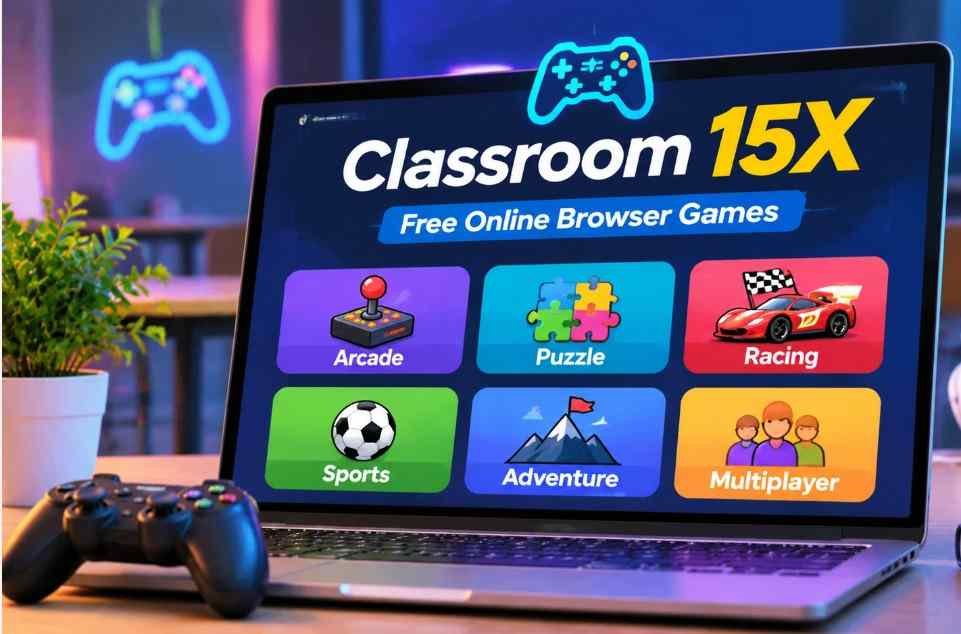
Classroom 15X is a name typically related to web sites offering collections of free online browser games. These web sites convey exceptional gaming categories together in a single vicinity. Players can discover arcade demanding situations, racing games, puzzles, sports activities, and other leisure options.
However, more than one websites use similar names. Their capabilities, recreation collections, and protection practices can also range. Understanding how these web sites work can help users make higher picks.
What Is Classroom 15X?
Classroom 15X generally refers to browser-based gaming portals wherein site visitors can access unique video games thru a website. Most games run without delay internal a browser with out requiring traditional software installation.
The web sites are regularly associated with unblocked gaming searches because students search for browser video games that work on college devices.
However, the name does no longer identify one validated business enterprise or professional instructional carrier. It is also now not linked to Google Classroom.
Depending on the website, site visitors may locate video games covering distinctive pastimes and difficulty degrees.
Popular Game Categories Available
One purpose browser gaming portals entice interest is their variety. Different classes offer specific reports, permitting gamers to pick according to their hobbies.
Here are a few not unusual classes located on these websites:
1. Arcade Games
Arcade video games consciousness on quick demanding situations, easy controls, and brief gameplay classes. Players can test their response pace and improve their performance thru repeated attempts.
2. Puzzle Games
Puzzle video games encourage logical wondering and trouble-fixing. They regularly contain matching objects, solving challenges, or completing special degrees.
3. Racing Games
Racing games permit gamers to govern cars, motorcycles, or different cars. Players can experience velocity demanding situations, impediment guides, and aggressive tracks.
4. Sports Games
Sports video games convey famous activities right into a digital environment. Common examples encompass football, basketball, cricket, and other sports-stimulated demanding situations.
5. Adventure Games
Adventure games usually contain exploring environments, finishing missions, and overcoming limitations. They can provide longer gameplay reports than easy arcade titles.
6. Multiplayer Games
Some browser gaming web sites additionally characteristic multiplayer alternatives. These video games allow users to compete or cooperate with different gamers, relying on the man or woman game’s features.
Key Features of Browser Gaming Websites
Different websites the usage of this name might also provide unique functions. However, several characteristics are normally associated with these gaming portals.
-
Browser-based totally access: Many video games run at once through a general web browser.
-
Different categories: Players can discover arcade, puzzle, racing, and sports games.
-
No conventional set up: Many titles do no longer require separate sport downloads.
-
Simple navigation: Game collections often use categories and clickable thumbnails.
-
Device flexibility: Supported video games may go on laptops, desktops, tablets, and Chromebooks.
-
Quick gameplay: Many titles provide quick rounds appropriate for occasional amusement.
These capabilities make browser gaming handy for people who select simple on line entertainment.
How to Access and Play Games
Getting started with a browser recreation is typically truthful.
Follow those wellknown steps:
-
Open a web browser to your device.
-
Enter the precise website address you want to visit.
-
Check the internet site’s privateness and safety information.
-
Browse the to be had game classes.
-
Select a game that interests you.
-
Follow the sport’s instructions to begin playing.
Most browser video games use easy keyboard or touchscreen controls.
Remember that website accessibility depends in your net connection, browser settings, and community regulations.
Can You Play on a Chromebook?
Chromebooks aid many browser-based games through their integrated internet browsers. Games advanced with present day internet technologies can regularly run with out extra installation.
However, overall performance depends on the character recreation and Chromebook specifications.
| Device | Browser Gaming Support | Important Consideration |
|---|---|---|
| Chromebook | Many browser games | School restrictions may additionally apply |
| Windows laptop | Broad browser support | Performance varies |
| MacBook | Many browser games | Browser compatibility matters |
| Desktop computer | Broad browser support | Internet speed influences loading |
| Tablet | Selected browser games | Touch controls may additionally vary |
| Smartphone | Selected browser games | Smaller monitors have an effect on gameplay |
A website starting effectively does not mean every recreation will run easily. Some video games might also require greater memory or processing strength.
Is Classroom 15X Safe to Use?
Online protection deserves attention, particularly when students use unusual gaming websites.
There isn’t any single protection guarantee protecting every internet site using this call. Different variations may additionally show unique commercials, links, and recreation content material.
Before playing, don’t forget these precautions:
-
Check the entire website address.
-
Avoid suspicious commercials and pa-ups.
-
Never enter college passwords on gaming web sites.
-
Avoid downloading unknown documents or browser extensions.
-
Do no longer offer needless personal records.
-
Close pages that request unexpected permissions.
-
Follow your college’s net-use policy.
Parents must also overview sport content material before permitting younger kids to get admission to unfamiliar websites.
Some collections may additionally incorporate shooting, horror, or other age-touchy games. Therefore, checking person titles is essential.
Is It Connected to Google Classroom?
No. Despite the similar wording, those are exceptional services.
Google Classroom is an educational platform used by faculties to prepare assignments, talk with college students, and manage lecture room activities.
By contrast, Classroom 15X typically refers to browser-game web sites.
Students have to never assume that a gaming website belongs to their school virtually due to the fact its name carries the phrase school room.
Always use the legit faculty-furnished hyperlink for assignments and educational activities.
Advantages and Limitations
Browser gaming gives comfort, but users ought to recognize its barriers.
| Advantages | Limitations |
|---|---|
| Quick browser access | Some websites incorporate advertisements |
| Different game categories | Game nice can vary |
| No traditional installation for many games | Some games want more potent devices |
| Simple controls | Website availability might also change |
| Short leisure sessions | Not each sport suits children |
| Works on supported devices | School networks can also limit get right of entry to |
The excellent approach is to treat on-line games as occasional leisure in place of a substitute for studying, outdoor activities, or right display screen breaks.
Final Thoughts
Browser-based gaming presents an accessible manner to enjoy leisure without installing big programs. Different game classes additionally give gamers lots of choices.
Classroom 15X is a name associated with numerous on line gaming websites, in place of one verified academic platform. Users should test individual web sites before gambling and avoid assuming that each model offers the same functions.
Most importantly, experience online games responsibly. Follow college regulations, defend private information, and pick age-appropriate content.
Frequently Asked Questions (FAQs)
1. What is Classroom 15X used for?
It generally refers to web sites that gather free browser-based video games throughout classes along with arcade, racing, puzzles, and sports.
2. Are these browser games loose?
Many web sites gift their video games as free to play. However, commercials and capabilities can also differ between man or woman websites.
3. Can I play games without downloading software program?
Many titles run at once inner a browser. Avoid websites that request needless downloads or unexpected extensions.
4. Does it work on school Chromebooks?
Some browser games support Chromebooks. However, faculty network regulations and tool settings might also prevent access.
5. Is Classroom 15X an respectable Google product?
No. It is not an legit Google academic product and has no mounted reference to Google Classroom.
Ramsey Classroom: Features, Benefits, Online Learning Tools and Financial Education Guide








Leave a Reply